 | Active TopicsSearchRegisterLogin |
| WIP (Work In Progress) | |
 Pixel Joint Forum : Pixel Art : WIP (Work In Progress) Pixel Joint Forum : Pixel Art : WIP (Work In Progress) |
 Topic: My First Pixel Art Topic: My First Pixel Art |
  |
| Author | Message |
|
Babunar
Seaman 

Joined: 11 June 2007 Online Status: Offline Posts: 8 |
   Topic: My First Pixel Art Topic: My First Pixel ArtPosted: 11 June 2007 at 9:52am |
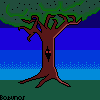 There. I'm not too pleased with the shading on the tree and the grass is a bit bland, but I'm proud of it as my first piece. You can see where I tried some dithering in the sky too. I use Graphics Gale... is that good? A tutorial reccomended it to me.. at the moment I can't see any differences with MSPaint :S Now I'm working on a mech-thingy. Edited by Babunar - 11 June 2007 at 9:52am |
|
|
Don't take life so seriously. You're not going to get out of it alive.
|
|
 IP Logged IP Logged |
|
|
Pixitis
Seaman

Joined: 31 May 2007 Location: United Kingdom Online Status: Offline Posts: 23 |
Posted: 11 June 2007 at 9:55am |
|
You should definatly add some more colours. For the tree stump maybe adding a few shadows and some buffer shades. Don't know if i'm correct but maybe a bit of SelOut.
The grass is also a bit plain. You may want to add some more details.
Edit: I don't like the bushy part of the tree. I dont like the "Pillowshading?"
Edited by Pixitis - 11 June 2007 at 9:55am |
|
|
IP Logged |
|
|
Babunar
Seaman
Joined: 11 June 2007 Online Status: Offline Posts: 8 |
Posted: 11 June 2007 at 9:57am |
|
Thanks for the C+C.
Erm, what's buffer shading? And SelOut? |
|
|
Don't take life so seriously. You're not going to get out of it alive.
|
|
|
IP Logged |
|
|
Pixitis
Seaman
Joined: 31 May 2007 Location: United Kingdom Online Status: Offline Posts: 23 |
Posted: 11 June 2007 at 10:03am |
|
Well, instead of having one solid shade, one normal and one light colout. You could have a buffer shade which you don't use too much of to blend with the next colour.
*Someone please correct me if i'm wrong*
And SelOut is "Selective Outlining". Don't just have a black outline, use a colour to make it look realistic. |
|
|
IP Logged |
|
|
Babunar
Seaman
Joined: 11 June 2007 Online Status: Offline Posts: 8 |
Posted: 11 June 2007 at 10:05am |
|
Ah I seeeee....
What do you think I should do with the sky? |
|
|
Don't take life so seriously. You're not going to get out of it alive.
|
|
|
IP Logged |
|
|
Pixitis
Seaman
Joined: 31 May 2007 Location: United Kingdom Online Status: Offline Posts: 23 |
Posted: 11 June 2007 at 10:07am |
|
Its up to you. *I said that because i have no idea at the moment*
Maybe add some clouds? |
|
|
IP Logged |
|
|
Babunar
Seaman
Joined: 11 June 2007 Online Status: Offline Posts: 8 |
Posted: 11 June 2007 at 10:08am |
|
Oh yeah, that's a good idea....
*goes and clicks furiously* |
|
|
Don't take life so seriously. You're not going to get out of it alive.
|
|
|
IP Logged |
|
|
Hapiel
Rear Admiral 

Joined: 30 June 2023 Online Status: Offline Posts: 3266 |
Posted: 11 June 2007 at 10:55am |
|
Hello :)
@ pixitis: Selective outline is that you just add outline to some parts, and not to the full image.. like pokemon sprites do.. its used in some styles of sprites, but if you have a fixed background its mostly the best to have no outline.. there is no pillowshading in this.. Ok now ontopic: You started dithering the sky.. continue it and do it with all 4 sky colors, both directions up and down.. now its just some squares of blue, than they go over in each other better.. Remove the black.. you can change the outline of the tree on the right side to a dark brown, or even try to do it with the dark sky color.. also remove the black dots in the tree. On the stump thing you should remove the black outlines on the right.. and there you can see the light is coming from the right.. but on the leaves its coming from down.. so change that.. the leaves should be the lightest at the right, and the darkest at the left.. you have a lighter shade of green on the right side as a sort outline now, thats unpossible if the light is coming from the right.. You have still some colors from the tree that are the same green as your grass.. the main color of the tree is now the darkest shade of green, and for the grass its too... maybe you should switch one of the main colors.. like the middle shade of green as main for the tree, and the darkest one for the grass. than you have 2 colors of grass/leaves left for more detail in the grass.. You can also add some texture on the tree with the darkest shade in the middle, but remember it should not look like wood, since it still has its 'skin'. I would put the tree some lower on the grass, now there is grass growing on the tree that is higer than the horizon.. and thats pretty weird.. so just move it down.. and the difference between 2 colors of the sky arnt very different.. make the one that is not the darkest but the second darkest some darker.. and dont forget to finish your dithering :) It looks like a long list, but pixel art is about patience, and if you do exactly what I just wrote and nothing more you can be done in 10 minutes  |
|
|
IP Logged |
|
| |
||
Forum Jump |
You cannot post new topics in this forum You cannot reply to topics in this forum You cannot delete your posts in this forum You cannot edit your posts in this forum You cannot create polls in this forum You cannot vote in polls in this forum |
|
