Buckingham Palace [help]
Printed From: Pixel Joint
Category: Pixel Art
Forum Name: WIP (Work In Progress)
Forum Discription: Get crits and comments on your pixel WIPs and other art too!
URL: https://pixeljoint.com/forum/forum_posts.asp?TID=12241
Printed Date: 14 June 2026 at 12:05pm
Topic: Buckingham Palace [help]
Posted By: kallango
Subject: Buckingham Palace [help]
Date Posted: 30 May 2011 at 4:32pm
|
Good person, I recently sent a pixel art in which the same pictures of Buckingham palace. What I wonder is, what if you could add in pixels (shadow, drawings, etc ...)
See it below: 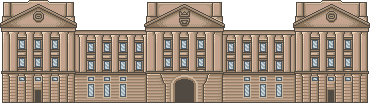
I appreciate all the support and sorry for English (Google translator (Portuguese> English)) |
Replies:
Posted By: tanuki
Date Posted: 30 May 2011 at 5:13pm
quick edit-

I added a little bit of shadow to the left side. This gives it more depth. |
Posted By: kallango
Date Posted: 31 May 2011 at 1:15pm
|
Originally posted by tanuki
quick edit-
I added a little bit of shadow to the left side. This gives it more depth. I actually saw an improvement in the design profundação, thank you for the edit and I think that is me going in the coming struggling |
Posted By: kallango
Date Posted: 01 June 2011 at 7:54am
| Come on guys, I need more aid |
Posted By: cure
Date Posted: 01 June 2011 at 9:31am
| well it's already been submitted to the gallery, so clearly it's no longer a WIP. |
Posted By: cure
Date Posted: 01 June 2011 at 6:03pm
|
By which I mean, ONLY submit to the gallery when a piece is finished and you no longer intend on doing any major work to it. Until then, go through the WIP forum and refine it. If you have both a WIP thread and a gallery entry, we assume the gallery pieces is a WIP (which isn't allowed). anyway, here's an edit:  Partial edit of the left side. Your main issue right now is the building is flat. Nothing pops forward, nothing recedes back, it's all roughly the same tone. so I pushed some area back with shadow, and brought things like the pillars forward with lighter shades. also, your palette was really washed out. you need more contrast- your colors should cover a wide range of lights and darks. |