Random Guy
Printed From: Pixel Joint
Category: Pixel Art
Forum Name: WIP (Work In Progress)
Forum Discription: Get crits and comments on your pixel WIPs and other art too!
URL: https://pixeljoint.com/forum/forum_posts.asp?TID=13048
Printed Date: 22 April 2026 at 12:07am
Topic: Random Guy
Posted By: Zoraculus
Subject: Random Guy
Date Posted: 30 September 2011 at 4:26pm
|
I started today my third Pixel Art, THE RANDOM GUY! Yea, i didn't think him a name. He started like this:  Step 2:  Step 3:  And currently:  Any tips of visual to implement? His body size? That Hair? |
Replies:
Posted By: ChrisButton
Date Posted: 30 September 2011 at 7:04pm
|
If you're going to work with line art as your base, I suggest you try and
remove as many jaggies as you can. If you're unsure as to what jaggies
are, please visit Cure's pixel art tutorial thread located in the recources
and support section of the forum for more information!
|
Posted By: Mr Special
Date Posted: 30 September 2011 at 7:24pm
| This should be downsized drastically. Currently, it's rather huge, especially for a beginner. Work smaller and you have more control over the individual pixels. |
Posted By: ChrisButton
Date Posted: 01 October 2011 at 12:57am
|
^
Oh yeah, the smaller the better. Forgot to mention that.
Pixel art isn't like drawing, it's supposed to a different kind of art or something.
|
Posted By: onek
Date Posted: 02 October 2011 at 6:46am
|
the initial sketch has much more potential then what u made of it in the latest version...
size it down and keep it simple... somewhat like so: 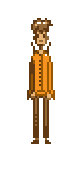
|
Posted By: reis
Date Posted: 02 October 2011 at 7:21am
| Beginners should start with small pixel art, and improves the body's anatomy. It's always nice to do a work in 3D! |