 | Active TopicsSearchRegisterLogin |
| WIP (Work In Progress) | |
 Pixel Joint Forum : Pixel Art : WIP (Work In Progress) Pixel Joint Forum : Pixel Art : WIP (Work In Progress) |
 Topic: First Effort at Pixel Art (and art in general) Topic: First Effort at Pixel Art (and art in general) |
  |
| Author | Message |
|
Grog
Seaman 
Joined: 21 July 2017 Online Status: Offline Posts: 3 |
   Topic: First Effort at Pixel Art (and art in general) Topic: First Effort at Pixel Art (and art in general)Posted: 14 July 2011 at 9:01am |
|
Hi all,
Recently, since finishing uni and being unemployed thought I'd quite like to design a computer game. So I've started learning flash and now want to do the game in a cool pixel art style. I haven't really touched art since I was in 14, except helping my gf with her art BTEC, but that was more just coming up with concepts. So I was hoping for some help as I develop into the next pixasso (damn it! that should have been by user name!). Anyway, here's my basic outline and fill, can anyone give me a hand with directing me how to shade? Also I haven't a clue on how to do eyes.  P.S. Ignore the green smudge on the t-shirt, it's just based on a t-shirt I have that has a number 5 and a bull on it's hind legs on it. P.P.S. I probably, most definitely, won't use this sprite in my game; it's just to get some practice in. Although, if and when I do complete the game, I might give him a cameo for nostalgia's sake. |
|
 IP Logged IP Logged |
|
|
CELS
Commander 

Joined: 23 September 2022 Online Status: Offline Posts: 758 |
Posted: 14 July 2011 at 10:22am |
|
Good start
It's probably better if you try to do eyes and shades yourself. There are some good tutorials on here in the FAQ threads, check those out. You'll learn more by experimenting rather than having someone say "put some shade where his hair meets his forehead". |
|
|
IP Logged |
|
|
Grog
Seaman
Joined: 21 July 2017 Online Status: Offline Posts: 3 |
Posted: 14 July 2011 at 11:12am |
|
Thanks for the input, given shading a go, please don't laugh if it's poo. I'm very much open to criticism though. Will try the eyes in a bit. The little yellow dot is where I put my light source.
 ETA: Eyes!  Edited by Grog - 14 July 2011 at 11:19am |
|
|
IP Logged |
|
|
cure
Commander

Joined: 23 March 2022 Online Status: Offline Posts: 2859 |
Posted: 14 July 2011 at 11:27am |
|
Estimated time of arrival: eyes?
Legs are way too small for the torso and head, they’re like half the length of the arms, in fact. The palette used on the face feels dead, use more saturation, human skin should have life. The shading on the hair is basically a banded gradient and doesn’t conform to the actual shape of the hair or cranium beneath. He needs a neck, unless that’s a turtleneck tshirt. Pants are too dark, use one of the lighter blues and axe the others, the shading here makes no sense either. Shirt is likewise shaded without any rhyme or reason I can spot, keep in mind the shapes of the 3d forms you’re trying to depict, break them into planes if you have to. What kind of game is this? If it’s a side-scroller, your character might have some trouble walking to the side, since he’s facing us. My advice: forget the shirt, jeans, belt, hair, and color right now. Get a readable sprite outline with believable proportions first, then move on to the other stuff. |
|
|
IP Logged |
|
|
onek
Commander

Joined: 19 May 2009 Online Status: Offline Posts: 416 |
Posted: 14 July 2011 at 7:54pm |
|
...everything what cure said...
heres an edit hopefully providing some useful information... 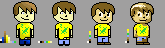
note : my last verion uses only 8 instead of 21 colors! |
|
|
IP Logged |
|
|
Grog
Seaman
Joined: 21 July 2017 Online Status: Offline Posts: 3 |
Posted: 15 July 2011 at 2:51am |
|
Thanks for the criticism, like I said I'm a fairly crap artist and it really helps. That edit that onek posted looks really cool.
I've started again, for reference the game is hopefully going to be set out like a top down rpg, well not GTA style top down, more FFVI top down but with a higher pixel count. I'm really struggling to get that perspective though, it just seems to always look like the character is looking straight out of the picture. I tried to correct it in my 2nd go but it kind of just looks like a beret rather than the policeman's cap I was going for. Anyway here's my two outlines, hope they show a bit more promise than my first effort.   |
|
|
IP Logged |
|
| |
||
Forum Jump |
You cannot post new topics in this forum You cannot reply to topics in this forum You cannot delete your posts in this forum You cannot edit your posts in this forum You cannot create polls in this forum You cannot vote in polls in this forum |
|
