Help with this Pixel
Printed From: Pixel Joint
Category: Pixel Art
Forum Name: WIP (Work In Progress)
Forum Discription: Get crits and comments on your pixel WIPs and other art too!
URL: https://pixeljoint.com/forum/forum_posts.asp?TID=8843
Printed Date: 13 June 2026 at 5:24pm
Topic: Help with this Pixel
Posted By: KrunchyWaffle
Subject: Help with this Pixel
Date Posted: 26 July 2009 at 2:24am
|
Hi I'm new to this pixelling thing. I have a question about shading. I worked out my light source the problem is how do I do it?
PS: How do I get the kind of chrome effect like on dics.
Picture:
 |
Replies:
Posted By: Hatch
Date Posted: 27 July 2009 at 9:23am
|
Hey KrunchyWaffle.
I believe this would be more appropriate (and therefore get more responses) in http://pixeljoint.com/forum/forum_topics.asp?FID=8 - the WIP forum . ------------- |
Posted By: skamocore
Date Posted: 27 July 2009 at 9:28am
|
*moved*
------------- |
Posted By: KrunchyWaffle
Date Posted: 28 July 2009 at 4:10am
| Okay and sorry. But does anyone know how to get a chrome effect on the Navigational button? |
Posted By: minipuck
Date Posted: 28 July 2009 at 4:22am
|
chrome as you can see in this picture http://geekologie.com/2007/03/chrome-wii.jpg has very strong highlights and is very reflective, so that is how you should shade it. Not exactly sure on how to exactly shade it, but thats what i usualy do, look at real objects to see how it works. edit: i gave a very quick attempt at how i thought it should look, not sure if its correct. 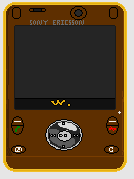 editedit: i found this picture that i think it pretty similar to what you made. http://www.letsgomobile.org/images/reviews/0048/sony-ericsson-w910.jpg and realized that the shading i applied if for a bulb and the real thing is more flat. ------------- http://dragcave.net/viewdragon/G3eW"> 
please click it, otherwise it will die, and it seems special. |