 | Active TopicsSearchRegisterLogin |
| WIP (Work In Progress) | |
 Pixel Joint Forum : Pixel Art : WIP (Work In Progress) Pixel Joint Forum : Pixel Art : WIP (Work In Progress) |
 Topic: [WIP] Robots, ChiBots and Clown Bots, Oh my Topic: [WIP] Robots, ChiBots and Clown Bots, Oh my |
  |
| Author | Message |
|
KingOfTheTrolls
Midshipman 

Joined: 27 January 2010 Online Status: Offline Posts: 42 |
   Topic: [WIP] Robots, ChiBots and Clown Bots, Oh my Topic: [WIP] Robots, ChiBots and Clown Bots, Oh myPosted: 08 August 2010 at 4:12pm |
|
Well um I'm made these sprites and idk what to do next...
 Inspired by Wii Bot Edited by KingOfTheTrolls - 15 August 2010 at 6:03pm |
|
 IP Logged IP Logged |
|
|
cure
Commander 

Joined: 23 March 2022 Online Status: Offline Posts: 2859 |
Posted: 08 August 2010 at 4:30pm |
|
too much reliance on black outlines imo
and try some shading, even if it's just one more shade of grey (actually just make your dark grey darker and use it) dunno why you chose to aa to the bg since the bg isn't significant and sprites are meant to look good set against different backgrounds. character design is pretty boring, nothing really special or noticeable about the robot |
|
|
IP Logged |
|
|
KingOfTheTrolls
Midshipman
Joined: 27 January 2010 Online Status: Offline Posts: 42 |
Posted: 08 August 2010 at 5:14pm |
|
Thanks yeah they were just quick 20 min sprites I hadn't really had time to shade yet I shall try that now :)
|
|
|
IP Logged |
|
|
onek
Commander

Joined: 19 May 2009 Online Status: Offline Posts: 416 |
Posted: 08 August 2010 at 5:15pm |
|
with that outer aa ull probably get in trouble on other backgrounds than white,
its best for sprites to leave the outline black (dark) and only aa on the inside
u could try to add more details to the sprite to make it more interesting... some shading wouldnt hurt either,... also i think it could need some more personality, it looks pretty neutral, make it like cute or mean or something like that
heres an edit for the fun of it...
 NOTE: its the same amount of colors Edited by onek - 08 August 2010 at 5:17pm |
|
|
IP Logged |
|
|
KingOfTheTrolls
Midshipman
Joined: 27 January 2010 Online Status: Offline Posts: 42 |
Posted: 08 August 2010 at 5:42pm |
|
Thanks :) I'll try and follow your edit. before I saw it.
I made these different heads  and I'm gonna go edit it again |
|
|
IP Logged |
|
|
KingOfTheTrolls
Midshipman
Joined: 27 January 2010 Online Status: Offline Posts: 42 |
Posted: 08 August 2010 at 10:12pm |
|
There made a couple ones off your edit, with that palette
and it turned out... ok. 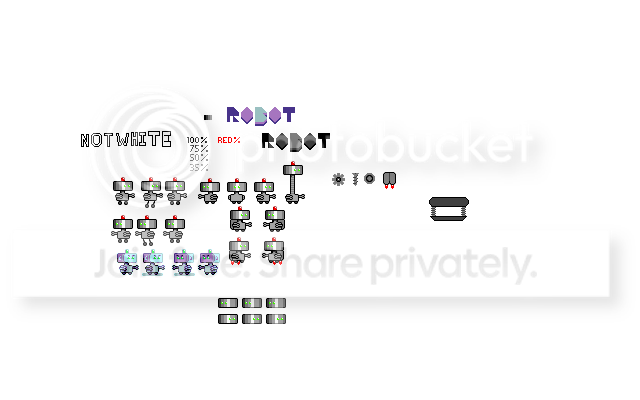 Ok and I made some Red ones  |
|
|
IP Logged |
|
|
W M
Commander

Joined: 08 November 2015 Online Status: Offline Posts: 132 |
Posted: 08 August 2010 at 10:43pm |
|
Try adding in some cool colors to the shades, such as blues or blue-purples. (onek already hit on this idea with his edit)
|
|
|
IP Logged |
|
|
KingOfTheTrolls
Midshipman
Joined: 27 January 2010 Online Status: Offline Posts: 42 |
Posted: 09 August 2010 at 1:44am |
|
Well in my newer one I used onek's as a ref and used the palette :)
|
|
|
IP Logged |
|
|
Delicious
Rear Admiral 

Joined: 18 January 2015 Online Status: Offline Posts: 273 |
Posted: 09 August 2010 at 4:41pm |
|
On the blue robot, it seems the head is not attached to the body because the sudden change from dark outline to light.
Anyways, here is another edit to help you... Basically, I fiddled around with the colors a bit more (I don't think I really improved them from Onek's edit) and did an edit on the outline and some other features.  Edited by Delicious - 09 August 2010 at 4:41pm |
|
|
IP Logged |
|
|
KingOfTheTrolls
Midshipman
Joined: 27 January 2010 Online Status: Offline Posts: 42 |
Posted: 09 August 2010 at 7:28pm |
|
Thanks delicious :)
Tried what you suggested and fixed a bit of lighting on the arms and I'm really starting to like it :) 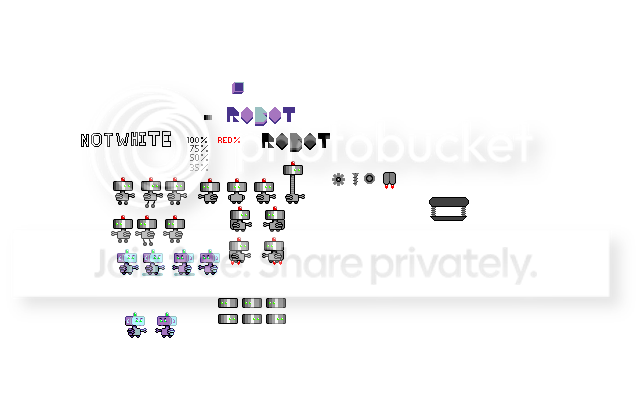 |
|
|
IP Logged |
|
|
KingOfTheTrolls
Midshipman
Joined: 27 January 2010 Online Status: Offline Posts: 42 |
Posted: 15 August 2010 at 6:02pm |
|
made some animations of Clown Bot
but can't add transparency with out the anim screwing up :/ Haaalp   the BG that caaaan work correctly >.>  |
|
|
IP Logged |
|
|
ekobor
Commander

Joined: 20 February 2018 Online Status: Offline Posts: 194 |
Posted: 15 August 2010 at 8:13pm |
|
What program did you use to animate it?
Depending on your program there will be a selection somewhere that says something like 'one frame at a time' or 'individual playback' or some such. That will make it so that the program doesn't try to overlap all the frames at once, which shows on a transparent background. In some programs you have to save each frame with a transparent background individually or something... I'm sure someone out there could explain this better than I D= |
|
|
IP Logged |
|
|
KingOfTheTrolls
Midshipman
Joined: 27 January 2010 Online Status: Offline Posts: 42 |
Posted: 15 August 2010 at 9:13pm |
|
thanks that helped somewhat I decided to throw a boarder on it just so I wouldn't have to firgure it out. but I think it would look better so I'll look into that. thanks anyway :)
|
|
|
IP Logged |
|
|
jalonso
Admiral 

Joined: 29 November 2022 Online Status: Offline Posts: 13537 |
Posted: 15 August 2010 at 10:40pm |
|
Get unFreez, free and easy...do eet!
|
|
|
|
|
|
IP Logged |
|
| |
||
Forum Jump |
You cannot post new topics in this forum You cannot reply to topics in this forum You cannot delete your posts in this forum You cannot edit your posts in this forum You cannot create polls in this forum You cannot vote in polls in this forum |
|
