 | Active TopicsSearchRegisterLogin |
| WIP (Work In Progress) | |
 Pixel Joint Forum : Pixel Art : WIP (Work In Progress) Pixel Joint Forum : Pixel Art : WIP (Work In Progress) |
 Topic: GameBoy Desert Tileset Topic: GameBoy Desert Tileset |
  |
| Author | Message |
|
Vine
Seaman 
Joined: 25 February 2014 Online Status: Offline Posts: 7 |
   Topic: GameBoy Desert Tileset Topic: GameBoy Desert TilesetPosted: 28 August 2011 at 6:00pm |
|
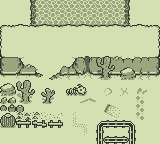
GameBoy desert tileset.
I don't really know what to say, just looking for critique I suppose. Suggestions? :> 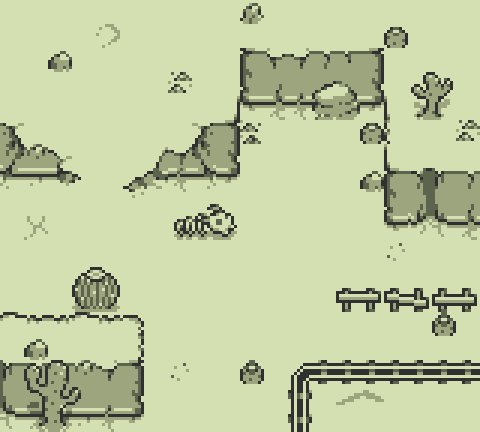
|
|
 IP Logged IP Logged |
|
|
CELS
Commander 

Joined: 23 September 2022 Online Status: Offline Posts: 758 |
Posted: 28 August 2011 at 6:06pm |
|
I think it's brilliant. Though if it wasn't for the cacti, I wouldn't know it was a desert. It might just as well be snow. I'm not sure how to fix that. I suppose you might want to fix the edges of the cliff, as they look a bit 'fluffy'. Also, make the flat terrain a bit more uneven, add more pebbles and such.
Anyway, I'm just guessing. I'm having a lot of trouble pixelling the desert myself. |
|
|
IP Logged |
|
|
jalonso
Admiral 

Joined: 29 November 2022 Online Status: Offline Posts: 13537 |
Posted: 28 August 2011 at 6:07pm |
|
Beautiful.
Maybe because there is ho GUI/HUD it looks empty, but I can see this tileset working. Some shadow issues. Cactus it goes back, skull down, round cactus down (I like the back leaning best.) Also, Pixeljoint has a zoom feature (just click any image) which everyone uses so you don't have to pre-zoom art ;) |
|
|
|
|
|
IP Logged |
|
|
Qemist
Commander
Joined: 31 August 2019 Online Status: Offline Posts: 239 |
Posted: 29 August 2011 at 3:38am |
|
It reminds me of this zelda game.. :) looking good!
|
|
|
IP Logged |
|
|
Vine
Seaman
Joined: 25 February 2014 Online Status: Offline Posts: 7 |
Posted: 29 August 2011 at 12:50pm |
|
One of my main concerns is the ramp, it feels like it isn't slanted at all, and I'm not entirely sure how to go about fixing it? :<
Originally posted by CELS
Though if it wasn't for the cacti, I wouldn't know it was a desert. It might just as well be snow. I noticed that too, couldn't really decide how to differentiate it from other stuff unless I spammed the floor with specks of sand or made snow diffferent enough so the player would recognize the difference. Originally posted by jalonso
Some shadow issues. Cactus it goes back, skull down, round cactus down. Also, Pixeljoint has a zoom feature (just click any image) which everyone uses so you don't have to pre-zoom art ;) Never noticed that, haha. Guess I'll push some shadows up. |
|
|
IP Logged |
|
|
neofotistou
Commander

Joined: 07 September 2015 Online Status: Offline Posts: 175 |
Posted: 30 August 2011 at 3:29am |
|
Here's a thought: I made the sun come from the top right. Maybe too
dramatic an angle (45 degrees would indicate afternoon) but you can
experiment with it. I think it helps readability and the sense of high
noon/desert heat.
Also, I disengaged your cactus on the right from the cliff, because they were sharing an outline at the top. Just a thought, though. I like this a lot. 
|
|
|
IP Logged |
|
|
Vine
Seaman
Joined: 25 February 2014 Online Status: Offline Posts: 7 |
Posted: 30 August 2011 at 2:47pm |
|
Ah, I see what you mean with the shadows, they look neat.
I'm experimenting with different kinds of shadows for now, haven't really decided which one to go with. I tried adding depth or something to the ramp to make it not look so flat by bending the walls near it, but it still looks relatively plain. I tried dithering it to get a "sub-shade" but it just doesn't look right, thinking I may have to redo the entire ramp. ): Tiny update: 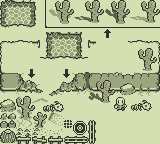
|
|
|
IP Logged |
|
|
neofotistou
Commander
Joined: 07 September 2015 Online Status: Offline Posts: 175 |
Posted: 30 August 2011 at 3:53pm |
|
The shadow on your second cactus inside the border looks killer. The ramp is actually fine, you may be overthinking it. But, if you want, you can try a dithered gradient with your light gray at the bottom of the ramp and the 'white' value at the top.
|
|
|
IP Logged |
|
|
Vine
Seaman
Joined: 25 February 2014 Online Status: Offline Posts: 7 |
Posted: 31 August 2011 at 5:36pm |
|
Alleviated some of the "lack of ramp looking angled."
Added shadows to everything. Fixed water border. Edited cliff outlines. Deleted a few obsolete tiles. 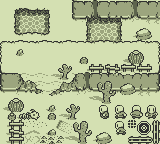
Made a few animations, looking for critique on them. Mostly, the left-facing one.   
Thanks for the help so far, everyone :> Edited by Vine - 31 August 2011 at 5:37pm |
|
|
IP Logged |
|
|
Mr Special
Commander

Joined: 20 December 2017 Online Status: Offline Posts: 106 |
Posted: 31 August 2011 at 5:52pm |
|
Wow, your tileset looks great! I like what you did with the ramp in the latest version. I'd really like to see even more terrain settings. What all do you have planned? You're doing a good job with this.
|
|
|
IP Logged |
|
|
jalonso
Admiral
Joined: 29 November 2022 Online Status: Offline Posts: 13537 |
Posted: 31 August 2011 at 7:30pm |
|
hmmm, you are having shadow issues still. The player has none. The water and mountains use front to back, and all other right to left. It stands out because of the simplicity and 4color palette.
I personally like the front to back so that shadows can hit the rock cliffs as the cactus in the first WIP showed. |
|
|
|
|
|
IP Logged |
|
|
Vine
Seaman
Joined: 25 February 2014 Online Status: Offline Posts: 7 |
Posted: 01 September 2011 at 8:53pm |
|
Why I've been refraining from anti-alias:
Wanted to make sure the character looked decent on different kinds of backgrounds, instead of only the lightest color. Example: -Lots of AA on head 
-Baby amounts of AA on head I went through and tried to anti-alias larger objects, and re-shadowed the water so the shadows are facing the appropriate direction. Haven't decided if I want that much anti-aliasing on some of the objects, but they look good regardless. This is probably the final version for this tileset unless someone points out something substantial, I'll probably start a different theme tomorrow :> 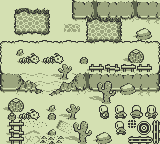
Originally posted by jalonso I'm tempted to say that fixing the shadows on the walls would be too much effort for how little an effect it'd have, but I'll have to play around with it and find out eventually I guess.
shadow issues still. The player has none. [...] mountains use front to back. I personally like the front to back so that shadows can hit the rock cliffs as the cactus in the first WIP showed. I liked the shadows hitting the cliffs as well, actually. I'm sure I can figure out a way to incorporate it somewhere even with these new shadows. Originally posted by Mr Special World Map
I'd really like to see even more terrain settings. What all do you have planned? This is not set in stone, at all. Just random ideas, I suppose. I imagine it will change drastically by the time I complete this project (if ever) ////////////////////////////// Update 9/2/11: Tried to make a dark cave tileset, using a darker shade as the "base color." As you can see, it DIDN'T WORK AT ALLLL. That being said, anyone have any tips on how to go about this? My best idea so far would be simply making the walls constructed of boulders as opposed to small pebbles or whatever the heck I ended up drawing.  Edited by Vine - 02 September 2011 at 10:50pm |
|
|
IP Logged |
|
| |
||
Forum Jump |
You cannot post new topics in this forum You cannot reply to topics in this forum You cannot delete your posts in this forum You cannot edit your posts in this forum You cannot create polls in this forum You cannot vote in polls in this forum |
|
