 | Active TopicsSearchRegisterLogin |
| WIP (Work In Progress) | |
 Pixel Joint Forum : Pixel Art : WIP (Work In Progress) Pixel Joint Forum : Pixel Art : WIP (Work In Progress) |
 Topic: Beginner- Need help on improving wooden sign Topic: Beginner- Need help on improving wooden sign |
  |
| Author | Message |
|
pikmin4000
Seaman 
Joined: 18 February 2013 Online Status: Offline Posts: 20 |
   Topic: Beginner- Need help on improving wooden sign Topic: Beginner- Need help on improving wooden signPosted: 19 February 2013 at 2:19pm |
 OK, so I'm fairly new to pixel art and I'm making a video game about a unicorn. (lol dis intro) Anyways, I would like some advice on what kind of step I should take to improve it. The average static tutorial would be to just "Add shadows/highlights then add more details". But umm, I'm at a standstill on how I would do that to this here flat sign. The sign is supposed to show legible text in the center with something like "SCHOOL" as it'll be at the entrance to where the unicorn will be going to (oh this is a platformer game by the way). So atm, my game has this pretty flat, straight on camera view. To show my current art style of game, here's a pic of it: 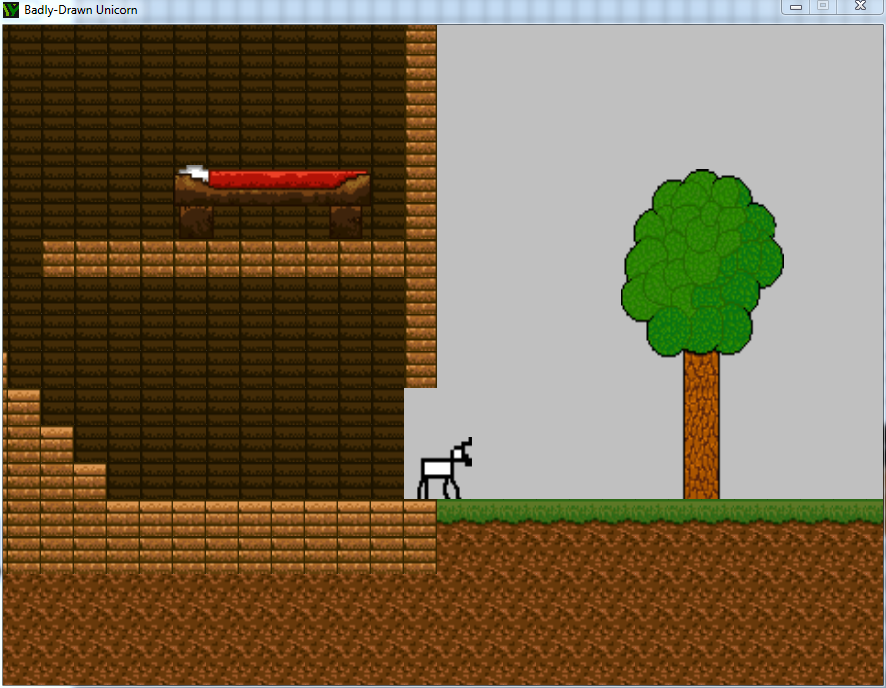 I really hope you can help me! Thanks! |
|
 IP Logged IP Logged |
|
|
pikmin4000
Seaman
Joined: 18 February 2013 Online Status: Offline Posts: 20 |
Posted: 23 February 2013 at 7:02am |
|
Bump! I really need to know what would be the next step in this sign!
Am I approaching the problem wrong? How would you create more textures you haven't done before/aren't familiar with? |
|
|
IP Logged |
|
|
crozier
Commander 

Joined: 08 May 2023 Online Status: Offline Posts: 190 |
Posted: 23 February 2013 at 10:30am |
|
First off, the sign is the least of your problems. Everything consists of shabby unrefined outlines with varying pixel sizes (ie the bed/unicorn is 2x everything else). Before you start doing texture work on general shading and lines. The wood exterior blends terribly with the earth, the colors in some areas are not too attractive (how do you fix this? Use other peoples' color pallets or pay more attention to saturation and hue shifting.) See here http://www.pixeljoint.com/forum/forum_posts.asp?TID=10946
The tree's outline is rather unrefined. The tree is also rather unrealistic (no shading, stump is way too thick), read this thread: http://www.wayofthepixel.net/index.php?topic=15027.msg138860#msg138860 (and also use references) As for the tiles, the grass isn't reading well as grass. This could be due to the dark green outline on top of it, or the last of contrast, or unappealing colors. The bricky lumber tiles are probably the best part of this screenshot/mockup. But the physics behind floating tiles and no doors could be improoved (just image what a house interior should look like.) I also think you could ditch the vertical black lines in between each tile. And make legitimate stairwells, don't just reuse your old tiles. The BG is boring and a terrible color. Use the satuarion for it and bring it a little closer to blue on the hue meter. Anyway, I hope I helped, even though its not what you are looking for. But frankly don't worry about texture, and worry about the big picture. As for the sign, just use references, and proper shading techniques. Good luck on this game/graphics. Edited by crozier - 23 February 2013 at 10:38am |
|
|
IP Logged |
|
|
pikmin4000
Seaman
Joined: 18 February 2013 Online Status: Offline Posts: 20 |
Posted: 23 February 2013 at 8:32pm |
|
Originally posted by crozier First off, the sign is the least of your problems. Everything consists of shabby unrefined outlines with varying pixel sizes (ie the bed/unicorn is 2x everything else). Before you start doing texture work on general shading and lines. The wood exterior blends terribly with the earth, the colors in some areas are not too attractive (how do you fix this? Use other peoples' color pallets or pay more attention to saturation and hue shifting.) See here http://www.pixeljoint.com/forum/forum_posts.asp?TID=10946 The tree's outline is rather unrefined. The tree is also rather unrealistic (no shading, stump is way too thick), read this thread: http://www.wayofthepixel.net/index.php?topic=15027.msg138860#msg138860 (and also use references) As for the tiles, the grass isn't reading well as grass. This could be due to the dark green outline on top of it, or the last of contrast, or unappealing colors. The bricky lumber tiles are probably the best part of this screenshot/mockup. But the physics behind floating tiles and no doors could be improoved (just image what a house interior should look like.) I also think you could ditch the vertical black lines in between each tile. And make legitimate stairwells, don't just reuse your old tiles. The BG is boring and a terrible color. Use the satuarion for it and bring it a little closer to blue on the hue meter. Anyway, I hope I helped, even though its not what you are looking for. But frankly don't worry about texture, and worry about the big picture. As for the sign, just use references, and proper shading techniques. Good luck on this game/graphics. Ok, I guess I'll do that first, lol. Oh and here's two versions since you said "unrefined", tell me which is better. The one with interpolation: 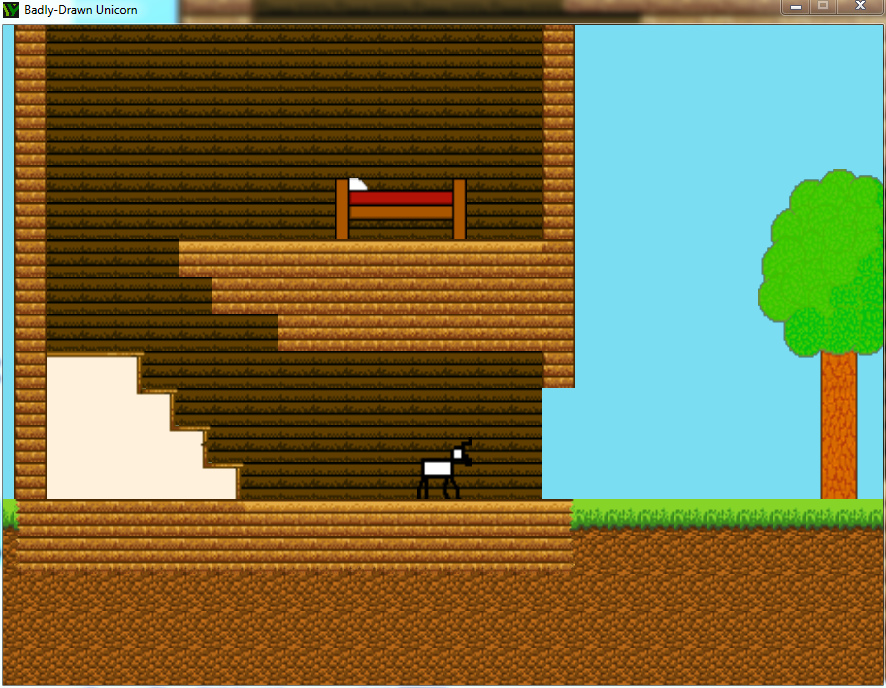 And the one without: 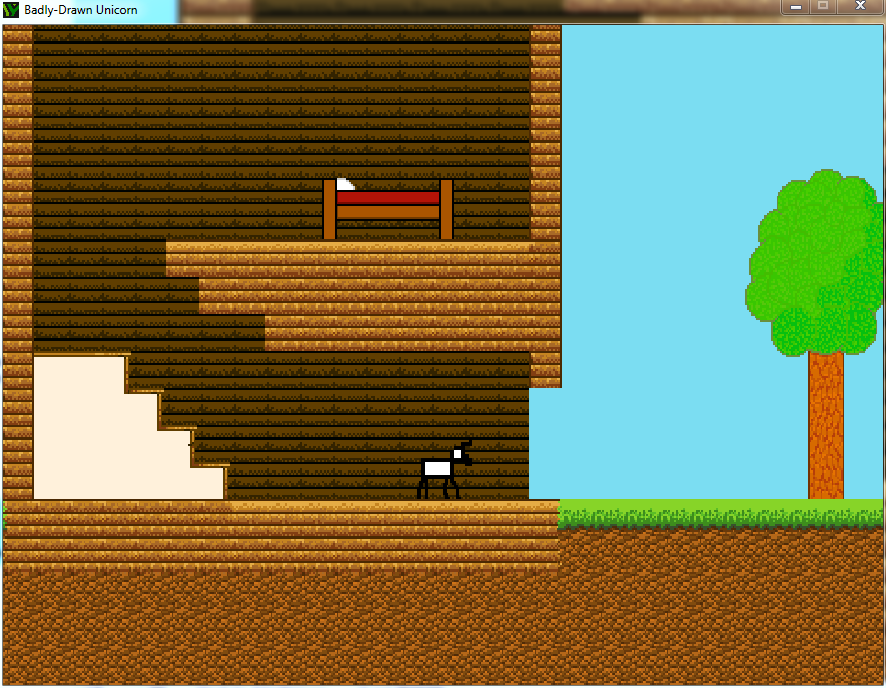 So I did some hue shifting, took different palettes, improved house interior, added new stairs, redid dirt/grass/wood. And I raised the tree's colors a bit. I cannot change it's structure too much as the player is going to interact with it (boost at it and knock it down). If you can see on top, I had trouble with the bed and temporarily left it like that for improvement. I had the same trouble with the sign as where I did not know how to texture it properly even with looking at a reference. If anyone would help me improve my game and/or bed and/or sign, that'll be great. |
|
|
IP Logged |
|
|
pikmin4000
Seaman
Joined: 18 February 2013 Online Status: Offline Posts: 20 |
Posted: 26 February 2013 at 7:13pm |
|
Bump. C'mon guys, my original question hasn't been answered yet. Ok so from a reference, how would one get down a texture? The pictures have a much higher resolution, so how would I get that?
Any help is appreciated. |
|
|
IP Logged |
|
|
A2J2TIWARI
Midshipman 

Joined: 07 August 2021 Online Status: Offline Posts: 91 |
Posted: 26 February 2013 at 11:34pm |
|
Dithering doesnt work for your pieces. Your tree looks weird. Maybe you should read the tutorials again? For your original question, I think you should see Cyangmou's pieces; he's best at wooden textures.
Anyways I'll link you to it: http://www.pixeljoint.com/pixelart/73173.htm# I hope this helps. |
|
|
IP Logged |
|
|
cure
Commander

Joined: 23 March 2022 Online Status: Offline Posts: 2859 |
Posted: 01 March 2013 at 6:38am |
|
The original question is not what is most important, as crozier said there are more fundamental issues here.
For instance, you want to draw a tree. But you're not creating a very convincing tree, you're creating a very flat symbol of a tree. This is because you lack training in the fundamentals of art. If you want to draw a tree trunk and foliage, you must first know how to shade basic geometric forms like cylinders and spheres. Practice doing that. You should also draw from reference, preferably from life since I assume there are trees where you live. Go outside. Draw a tree. Draw 50 trees. Then you will have a better understanding of how the branches grow out from the trunk, and how the foliage relates to the branches, and how areas of light and dark are unevenly dispersed through the foliage (instead of having a random uniform texture on top of a bunch of overlapping circles). I do not understand your questions about working from a reference. Resolution is irrelevant, you're just trying to mimic the texture. But to use a reference you must know how to deconstruct a reference, which takes practice practice practice and not bumping bumping bumping. |
|
|
IP Logged |
|
|
pikmin4000
Seaman
Joined: 18 February 2013 Online Status: Offline Posts: 20 |
Posted: 04 March 2013 at 2:48pm |
|
OK chillll, im bumping cause I wanna learn so badly. Well anyways on to fix the tree lol.
 So I tried going outside and draw some trees, but drawing trees was oh so very hard. All the leave details and branches just lost my eyes and it's getting pretty cold out so it's hard to stay in one spot for too long. Anyways, the point is, how could I get a tree structure down in pixel art and in real life? Before I just drew the trunk and added the balls of leaves, but apparently my structure was terrible. You tell me to practice, but how could I if I am doing it wrong. So what exactly is wrong with my structure now, if anything? could I just change the inside details to have longer leaves and better shading and would that fix it? I am planning on redoing the tree, but what exactly do I need to fix and why? |
|
|
IP Logged |
|
|
AtskaHeart
Commander

Joined: 06 June 2020 Online Status: Offline Posts: 114 |
Posted: 04 March 2013 at 3:21pm |
|
Your main problem is related to depth (which is related to shading and shapes). Your tree should look like a real tree, with volume, not a drawing.
|
|
|
IP Logged |
|
|
crozier
Commander
Joined: 08 May 2023 Online Status: Offline Posts: 190 |
Posted: 05 March 2013 at 5:33pm |
|
You are focusing on details and are kind of in the wrong mindset. Trees have slender shapes with protruding branches in varying directions. Trunks and branches have angles (the trunk doesn't touch the ground at a 90 degree angle/ the trunk is also often curved/ you can sometimes see the root structure near the bottom of the tree), and stuff like that.
It's like drawing a face. You can have all the detail in the world, but if the anatomy is terrible the drawing will look bad. If you google "tree", the 8th, 10th, and 18th images are good examples as to how shape is important in tree drawing. |
|
|
IP Logged |
|
|
jovan-millet
Seaman
Joined: 06 March 2013 Online Status: Offline Posts: 3 |
Posted: 07 March 2013 at 5:33pm |
|
Here's the way I learned to draw trees. It's actually really helpful, and is pretty eye-opening as to what actually goes into drawing a tree (versus seeing a tree in real life). Click Here
|
|
|
IP Logged |
|
| |
||
Forum Jump |
You cannot post new topics in this forum You cannot reply to topics in this forum You cannot delete your posts in this forum You cannot edit your posts in this forum You cannot create polls in this forum You cannot vote in polls in this forum |
|
