 | Active TopicsSearchRegisterLogin |
| WIP (Work In Progress) | |
 Pixel Joint Forum : Pixel Art : WIP (Work In Progress) Pixel Joint Forum : Pixel Art : WIP (Work In Progress) |
 Topic: WIP--Muddle's first dungeon Topic: WIP--Muddle's first dungeon |
  |
| Author | Message |
|
muddle
Seaman 
Joined: 21 August 2011 Online Status: Offline Posts: 5 |
   Topic: WIP--Muddle's first dungeon Topic: WIP--Muddle's first dungeonPosted: 21 August 2011 at 1:07pm |
|
Greetings all,
I have been lurking for a while, and decided to register and post my first attempt at pixel art. Looking forward to your critique. ( this is my first attempt at pixel-based art so any tips or techniques are most welcome.) -Muddle 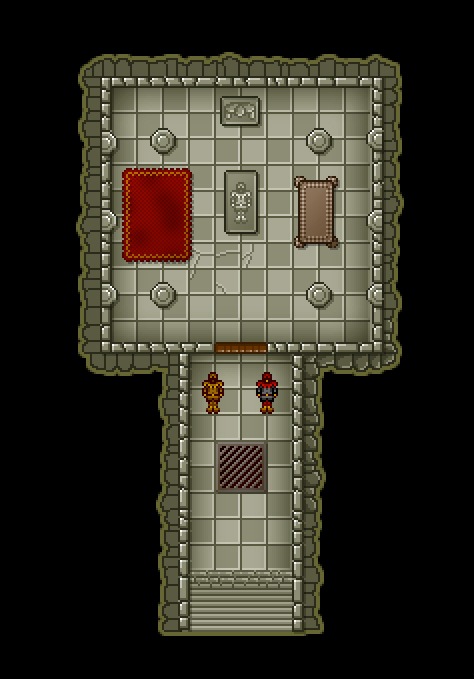
|
|
 IP Logged IP Logged |
|
|
CELS
Commander 

Joined: 23 September 2022 Online Status: Offline Posts: 758 |
Posted: 21 August 2011 at 1:49pm |
|
Looks good. A few things:
The light source is inconsistent. Judging from the statue, the sarcophagus, and the tiles on the floor, the light seems to be coming from the bottom right corner. But the walls and pillars have a light source on the opposite side, as does the table. The shadows should reflect the height of the object. Right now, the shadow cast by the carpet is as long as the shadow from the table and the pillars. This image has 3615 colors. Unless this was originally 30 colors before you saved the image, you may want to consider the following: A lot of people feel that pixelart is about controlling each pixel, and limiting the number of colors is a part of this. I guess the software you use creates a lot of gradients. Some would recommend that you do the coloring manually instead. You could probably replace the 3615 colors with 30 colors, and it might even end up looking better. |
|
|
IP Logged |
|
|
muddle
Seaman
Joined: 21 August 2011 Online Status: Offline Posts: 5 |
Posted: 21 August 2011 at 2:05pm |
|
Wow, i didn't know about a limit of 30 colors. Forgive me for asking what might be a totally obvious question, but why the number 30? is that based on a certain file format or technology? Are there any tutorials I should be reading up on?
|
|
|
IP Logged |
|
|
SumYungGai
Seaman

Joined: 23 July 2011 Online Status: Offline Posts: 10 |
Posted: 21 August 2011 at 2:19pm |
|
There isn't a strict -30 color- palette for video games or pixel pieces. However, you should always try to keep colors at a minimum. It looks to me like you used a lot of gradients. Never, ever use gradients in pixel pieces. (Most use of tools are frowned upon.) It ends up looking worse and destroys the minimal color goal that all pixel pieces share.
And if you're looking for tutorials... http://www.pixeljoint.com/forum/forum_posts.asp?TID=11299 and the entire resources forum can help you out. |
|
|
IP Logged |
|
|
CELS
Commander
Joined: 23 September 2022 Online Status: Offline Posts: 758 |
Posted: 21 August 2011 at 2:31pm |
|
The number 30 comes from a passage in the bible, John 15:15. "And Jesus said "And lo, there shall only be 30 colors in thy pixel art, lest thou falleth to temptation and use gradients."
Now you know. And knowing is half the battle. But seriously, the number of colors varies a lot. Some people paint huge things with only 2 colors, sometimes 8 colors, sometimes 50 colors, sometimes hundreds of colours or more. But a lot of the experienced guys on here recommend starting out with a small number of colors. The exact number you use is up to you. Edited by CELS - 21 August 2011 at 7:39pm |
|
|
IP Logged |
|
|
Qemist
Commander
Joined: 31 August 2019 Online Status: Offline Posts: 239 |
Posted: 21 August 2011 at 5:18pm |
|
altough its not totally pixel art I kinda like your gardient style. So if you're not aiming for 100% pixelart you could still do pixel lineart and create graphics like this. I think the rug is a bit too much, but that brown table(?) and pilars etc are pretty cool defined.
Agreed on the light source comment from CELS too |
|
|
IP Logged |
|
|
ChrisButton
Commander

Joined: 10 September 2010 Online Status: Offline Posts: 371 |
Posted: 21 August 2011 at 7:34pm |
|
LOL Cels.....
|
|
|
IP Logged |
|
|
muddle
Seaman
Joined: 21 August 2011 Online Status: Offline Posts: 5 |
Posted: 22 August 2011 at 5:41am |
|
Wow that's a great tutorial! thanks for the link! that really helps a bunch. thanks!
|
|
|
IP Logged |
|
|
muddle
Seaman
Joined: 21 August 2011 Online Status: Offline Posts: 5 |
Posted: 23 August 2011 at 5:47pm |
|
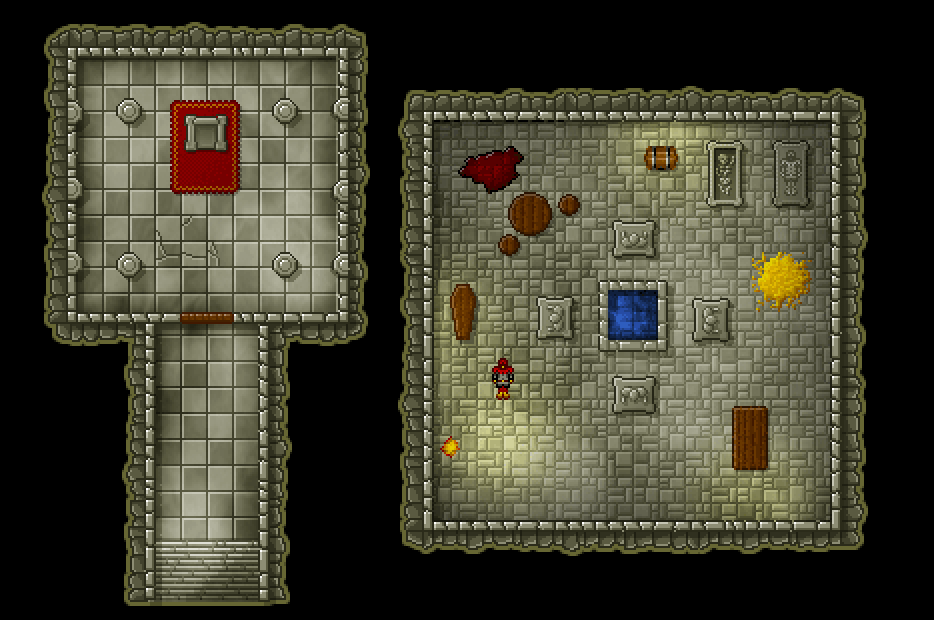
Here's a follow image to the project already shown... I am worried that this is still not officially pixel art ( i did use gradients but converted them all down to 256 colors in a gif file.) I really like the mood and effects of gradients, but I simply don't know how to create them any other way. Any suggestions on how to create gradient-like effects without gradients???
|
|
|
IP Logged |
|
|
jalonso
Admiral 

Joined: 29 November 2022 Online Status: Offline Posts: 13537 |
Posted: 23 August 2011 at 6:11pm |
|
Auto reducing gradients (cheating) or any other CG effect is not pixelart and considered a fail for pixelartists, but...it happens and some game do this
 (Pixeljoint does not accept them in the gallery). (Pixeljoint does not accept them in the gallery).Gradients can be made just with pixels and often its not the gradient that make a tileset look good but lighting and texture. TBH, I like your tileset but not love it. It can never be added to the PJ gallery as it is. Especially a reduction. ----- @CELS, that's your 2nd OTT smart/funny comment in one week  |
|
|
|
|
|
IP Logged |
|
|
muddle
Seaman
Joined: 21 August 2011 Online Status: Offline Posts: 5 |
Posted: 05 September 2011 at 8:17am |
|
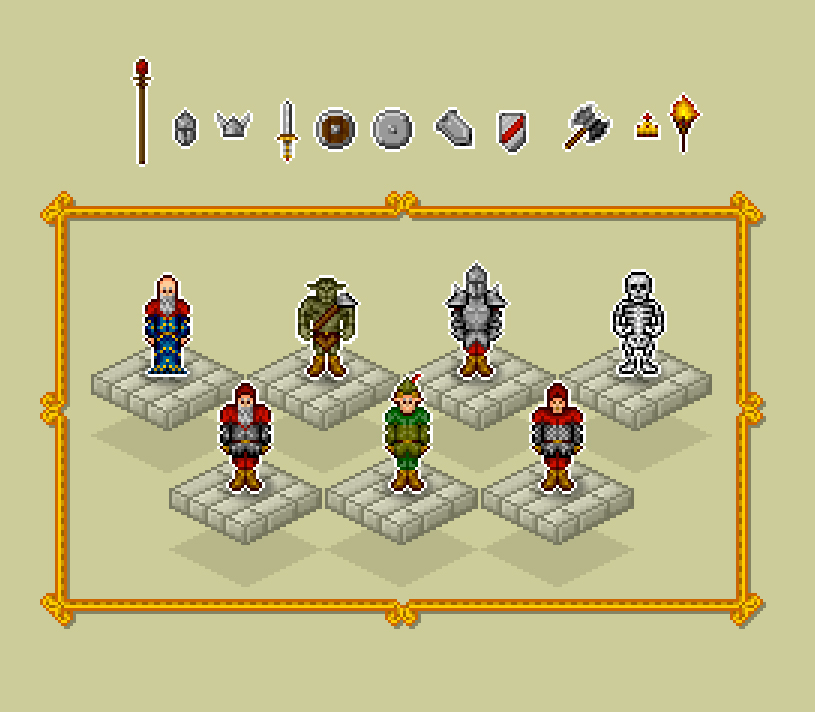
ok, still learning about things around here. here's something much less gradient-y.
|
|
|
IP Logged |
|
| |
||
Forum Jump |
You cannot post new topics in this forum You cannot reply to topics in this forum You cannot delete your posts in this forum You cannot edit your posts in this forum You cannot create polls in this forum You cannot vote in polls in this forum |
|
