 | Active TopicsSearchRegisterLogin |
| Resources and Support | |
 Pixel Joint Forum : The Lounge : Resources and Support Pixel Joint Forum : The Lounge : Resources and Support |
 Topic: What revisions do my pieces need? Topic: What revisions do my pieces need? |
  |
| Author | Message |
|
Sylon
Seaman 
Joined: 27 March 2006 Online Status: Offline Posts: 12 |
   Topic: What revisions do my pieces need? Topic: What revisions do my pieces need?Posted: 02 October 2011 at 10:17pm |
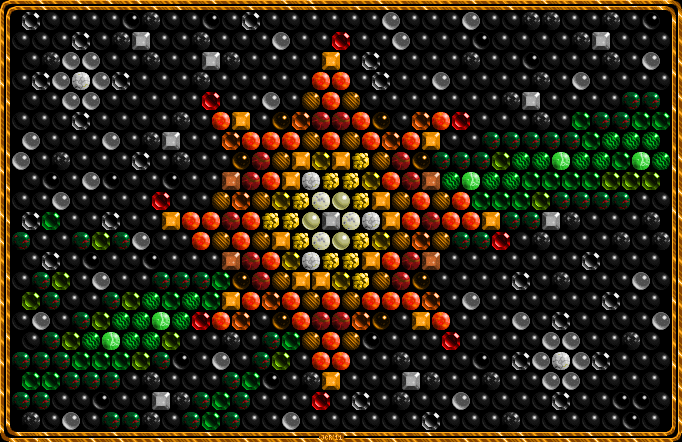 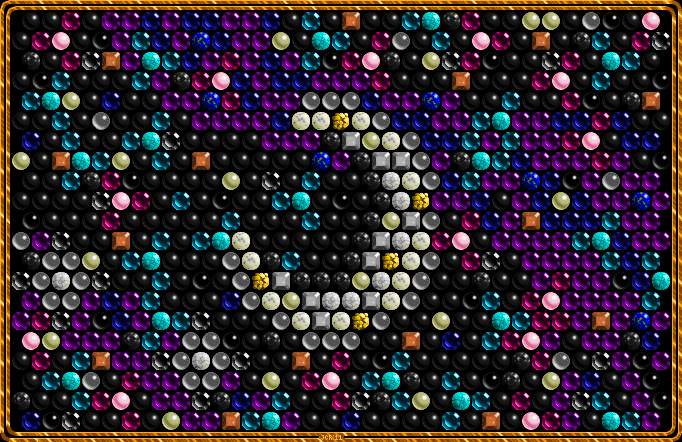 I received a message for both of these pieces which stated, "We're sorry to inform you that your submission does not meet our quality standards or the art needs revision for some miscellaneous reason." I am wondering what the reason is? Edited by Sylon - 02 October 2011 at 10:18pm |
|
 IP Logged IP Logged |
|
|
jalonso
Admiral 

Joined: 29 November 2022 Online Status: Offline Posts: 13537 |
Posted: 03 October 2011 at 5:43am |
|
I sent these back but will admit I was apprehensive at the same time.
I can see the pixelwork and for the most part its genuine. You did band and over pixel a lot but this is not a disqualifier. I felt that the color count was far too high to have been chosen. See the specs for the top image HERE. However, its possible that you made all the pieces on their own and then hue shifted and this accounts for the color count being so high. Ultimately there are some very light colored yellow orbs with greys in them that just don't seem to be pixelart (as defined for the PJ gallery) and was the reason I used the 'misc' for the revision note. You are welcome to explain the process or discuss here further. Its entirely possible that I am in the wrong here. Do note that pixels in the gallery should be pure and use no CG artifacts, tools or any other FX. |
|
|
|
|
|
IP Logged |
|
|
DawnBringer
Commander 

Joined: 11 August 2024 Online Status: Offline Posts: 568 |
Posted: 03 October 2011 at 6:11am |
|
Looks legit to me. The original basic colorramps can be spotted and every individual gem uses 10-20 clean colors. As this is a mockup/collage a high (total) colorcount shouldn't be a big concern.
|
|
|
IP Logged |
|
|
jalonso
Admiral
Joined: 29 November 2022 Online Status: Offline Posts: 13537 |
Posted: 03 October 2011 at 8:28am |
|
Originally posted by DawnBringer Looks legit to me. The original basic colorramps can be spotted and every individual gem uses 10-20 clean colors. As this is a mockup/collage a high (total) colorcount shouldn't be a big concern. As mentioned. I felt apprehensive about sending back for revision. I'll wait for artist comment and see what he says. |
|
|
|
|
|
IP Logged |
|
|
Sylon
Seaman
Joined: 27 March 2006 Online Status: Offline Posts: 12 |
Posted: 03 October 2011 at 11:16am |
|
Hello Jalonso! Thanks for answering.
I will tell you my process. A long time ago, I created 6 palettes which I have since used to design any pixel art piece. One is incomplete, but here they are: 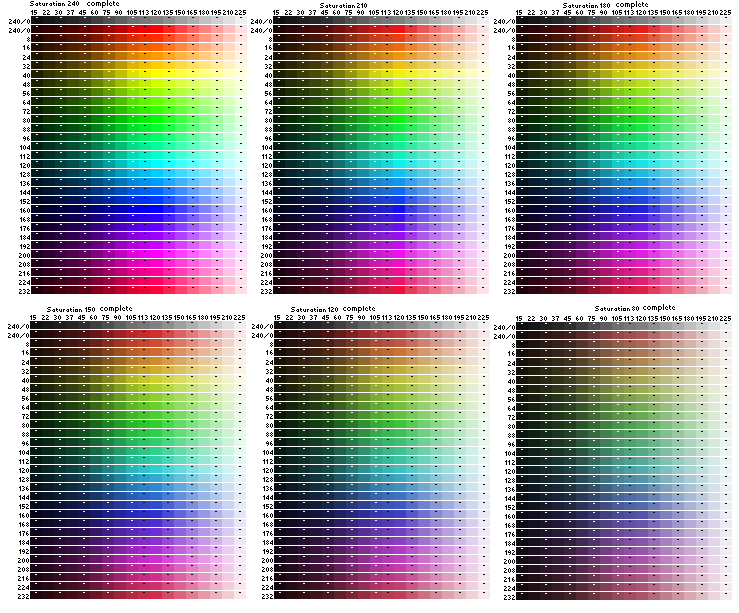 The numbers on the left indicate hue, and on the tops indicate luminosity. In the "Mosaics," I have also added about 3 or 4 colors that are at luminosity "7," which are not on the palettes. By "over-pixeling" I assume you mean making the colors so smooth, supposedly with differences in pixel color that the eye cannot see? I used no tools other than clicking pixel-by-pixel, filling, and copying and pasting. Didn't even use the line tool that much for these. The smoothness of the highlights is purely done pixel-by-pixel using the higher luminosities of my palettes. Ultimately I am not one to go out of my way reducing color count in my works. I am not new to pixeling, but have only recently read about "banding". Can you tell me where the banding is? Thanks! |
|
|
IP Logged |
|
|
jalonso
Admiral
Joined: 29 November 2022 Online Status: Offline Posts: 13537 |
Posted: 03 October 2011 at 12:23pm |
|
Banding is within some of the jewels. They are minor and are nitpicks.
Please re-submit your pieces so they can be added to your gallery. You can go to the existing art page and hit the 'resubmit' button at the bottom of the page. You can put both of these on the same page since as separate pieces they are redundant. Again, I was hesitant to send back, k. ps: Thatsa lotta colors o.O |
|
|
|
|
|
IP Logged |
|
|
Sylon
Seaman
Joined: 27 March 2006 Online Status: Offline Posts: 12 |
Posted: 03 October 2011 at 2:47pm |
|
Haha...I like a lotta colors.
Thanks! |
|
|
IP Logged |
|
|
jalonso
Admiral
Joined: 29 November 2022 Online Status: Offline Posts: 13537 |
Posted: 03 October 2011 at 4:45pm |
|
Its in the gallery. now :)
fyi, the subject of colors is a bit vague but do know that in places like Pixeljoint where the viewers are pixel savvy and into the art form lots of colors is seen as a negative for the most part. I can see why pieces such as these need more than 'normal' which is fine. The thing about less colors, which is a general term, what is usually meant by it is that almost everything can have the same final look even by reducing colors. In pixelart the least amount of colors used and still keep the vision intact shows skill and prowess and is highly admired. So yeah, thanks for not getting bent out of shape about the initial art rejection and bringing it here for discussion and clarification. We do sometimes make mistakes. |
|
|
|
|
|
IP Logged |
|
|
surt
Commander

Joined: 30 December 2015 Online Status: Offline Posts: 413 |
Posted: 03 October 2011 at 5:17pm |
|
Originally posted by Sylon I don't get this. How do you use these "palettes"? It seems to me that they are basically the whole colour space. What function do they serve?
A long time ago, I created 6 palettes which I have since used to design any pixel art piece. One is incomplete, but here they are: |
|

|
|
|
IP Logged |
|
|
Sylon
Seaman
Joined: 27 March 2006 Online Status: Offline Posts: 12 |
Posted: 03 October 2011 at 8:58pm |
|
Jalonso >> I see! When I zoom out of my pixels, I try to see what looks jagged to me, pixelly, squarish, and then wherever it is, I zoom back in and try to smooth it out. Maybe my tastes in smoothness are more strict than others'? I wonder whether I could "make the cut" with the skills you speak of, but I am not yet so sure I am interested in possessing those skills though :) .
Well Surt! They are basically the whole color space, yes. As the kind of artist I am, I would want the whole color space available to me without having to "Add to Custom Colors" all the time in MSPaint, and without having to trial & error my way through the colors to find the one that makes sense to put down next. That was how I pixeled before, in a very bumbling way, clicking through MSPaint way more than I needed to. The kind of pixel art I am interested in creating is mostly the smoothed-out kind, like Wayuki's work. |
|
|
IP Logged |
|
| |
||
Forum Jump |
You cannot post new topics in this forum You cannot reply to topics in this forum You cannot delete your posts in this forum You cannot edit your posts in this forum You cannot create polls in this forum You cannot vote in polls in this forum |
|
