 | Active TopicsSearchRegisterLogin |
| WIP (Work In Progress) | |
 Pixel Joint Forum : Pixel Art : WIP (Work In Progress) Pixel Joint Forum : Pixel Art : WIP (Work In Progress) |
 Topic: Website Ocean Background Topic: Website Ocean Background |
  |
| Author | Message |
|
pikmin4000
Seaman 
Joined: 18 February 2013 Online Status: Offline Posts: 20 |
   Topic: Website Ocean Background Topic: Website Ocean BackgroundPosted: 14 August 2013 at 9:53pm |
|
So I'm making a website: http://chillhammer.com/
and I would like to change the current background into something I made myself and easier to load in. So I started working on a pixel art background using that as a reference. Here is what I have so far: 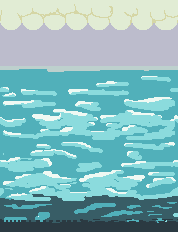 I do not know what my next step to improve it is... the background will repeat horizontally and have a solid color to anything below it. Kind of like how this site is shown: http://www.onegameamonth.com/ In pixel art I do not usually do backgrounds or large images so any tips would be appreciated. EDIT: I updated my site with the new background. This does not mean I am not open to any suggestions you may have! So here is the link to the reference I was using before (the old background) http://chillhammer.com/images/138.png Edited by pikmin4000 - 15 August 2013 at 7:29pm |
|
 IP Logged IP Logged |
|
|
coolsarahkry
Midshipman 

Joined: 23 June 2020 Online Status: Offline Posts: 90 |
Posted: 15 August 2013 at 8:19am |
|
Water is hard to draw. If you look at this image http://ykonline.yksd.com/distanceedcourses/Courses/PhysicalScience/Lessons/FirstQuarter/Chapter02/Lesson01/Images/LakeWaves.jpg
try and see that the bright parts of the water (highlights) connect, with holes in the middle of varying sizes(where the dark part of the water is. Then, above and below the 'groups' of highlights there is mostly dark water with some highlights scattered. Try and look at more pictures of water to get a hang of the shape of the water. That is very important to make it look like water. The water in your ref doesn't get that dark at the bottom. It looks like you are trying to view the water from the side, kind of like a platformer. If you are, maybe put the texture at the top only and put some seacreatures in the sea. If you are trying to make it look like water from above, make the dark move up in a gradiet like in this picture: http://upload.wikimedia.org/wikipedia/en/b/bc/Pleasant_lake_water.JPG It starts dark at the bottom and then gets lighter gradually. Don't make all the clouds the same shape, and they don't need to be attatched and at the top. I would space them out. Let me show you what I mean:  \ \
I know I just threw a lot at you; but take it one step at a time and you should be fine. We'll be here for you! :) |
|
|
IP Logged |
|
|
pikmin4000
Seaman
Joined: 18 February 2013 Online Status: Offline Posts: 20 |
Posted: 15 August 2013 at 9:28am |
|
Wow, thanks Cool Sarah! I don't mind if it's a lot, the more, the better!
So in order to get used to creating pixel art with water I did a little test with one of the references you gave me. This is what I came up with:  I'm starting to see what you mean by connecting highlights... Also, for my background, I was trying to aim for this sort of perspective: http://frogatto.googlecode.com/issues/attachment?aid=-8993428042245308661&name=frogatto+gfx+bug.jpg&token=CTFu_-uKDKYazjS-XQiqzDTYaj8%3A1376581679029&inline=1 I'll start to implement it into my design. Meanwhile, any more tips or links to useful references will be appreciated. oh and btw. i don't really know how you made such a great outline of a cloud nor how the above reference made the water such a smooth blend together. any tips will be helpful Edited by pikmin4000 - 15 August 2013 at 9:29am |
|
|
IP Logged |
|
|
coolsarahkry
Midshipman
Joined: 23 June 2020 Online Status: Offline Posts: 90 |
Posted: 15 August 2013 at 9:58am |
|
I have a few quick tips. For the water above (which is a HUGE improvement btw), you may be using too many hues. Less colors is easier.
I would suggest 3 colors for your water. The highlight you have right now is good, and I like the color inside your highlights too. You could use the inside color for all the water, and then just add the highlights, and maybe a darker shadow. For the cloud, I used a bigger pencil tool. I dotted the pencil in a concentrated area so it would look like a fluffy cloud, then added more circles to the edge of the cloud. You can use varying sizes for the brush. I think the reason the water looks so good in the ref is the repetition of shapes. Patterns are very important in pixel art. I had a classmate do an acrylic painting with a lake, at first it looked really ugly, but she repeated the highlights and even made them varying colors and it ended up looking just like the lake! Hopefully that can serve as some inspiration for you. |
|
|
IP Logged |
|
|
pikmin4000
Seaman
Joined: 18 February 2013 Online Status: Offline Posts: 20 |
Posted: 15 August 2013 at 6:10pm |
|
Thanks a lot for the reply! I made changes to the one you edited to come up with this
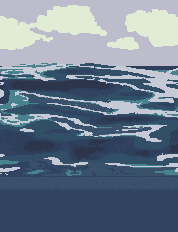 I wonder how you would come up with a pattern and what the process would be to create them if at the beginning they look bad... Anyways any tips to make the above art better will be appreciated.  Edited by pikmin4000 - 15 August 2013 at 6:11pm |
|
|
IP Logged |
|
|
coolsarahkry
Midshipman
Joined: 23 June 2020 Online Status: Offline Posts: 90 |
Posted: 15 August 2013 at 6:20pm |
|
Nice! I would make some of the lines less jagged- you have random pixels poking out at some points, try to make it more smooth.
Also, if you are going to put this on your website, I'm going to ask that you don't use the one I edited. You should try to make your own clouds :) |
|
|
IP Logged |
|
|
pikmin4000
Seaman
Joined: 18 February 2013 Online Status: Offline Posts: 20 |
Posted: 15 August 2013 at 6:47pm |
|
Ok, I made my own clouds and smoothed out most of the jagged lines I saw:
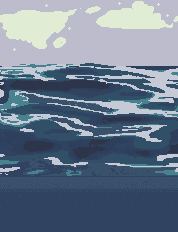 I'm still open for more suggestions! |
|
|
IP Logged |
|
|
Xhukari
Commander 

Joined: 22 June 2013 Online Status: Offline Posts: 106 |
Posted: 16 August 2013 at 4:34am |
|
I like the sea a lot, but I feel you need to work on your clouds more; just look at reference images. Clouds are generally bottom-heavy, and have peculiar shapes.
|
|
|
IP Logged |
|
|
pikmin4000
Seaman
Joined: 18 February 2013 Online Status: Offline Posts: 20 |
Posted: 16 August 2013 at 11:09am |
|
Originally posted by Xhukari I like the sea a lot, but I feel you need to work on your clouds more; just look at reference images. Clouds are generally bottom-heavy, and have peculiar shapes. Alright, thanks! So I updated the clouds to be more flat on the bottom, what do you think? 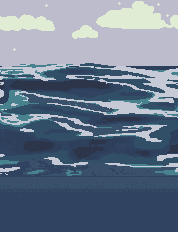 |
|
|
IP Logged |
|
|
Xhukari
Commander
Joined: 22 June 2013 Online Status: Offline Posts: 106 |
Posted: 16 August 2013 at 12:17pm |
|
Mmm it is better, but since you are going with this very definitive style, it may help the cloud if you have parts of them blending into the sky. Since at the moment they seem of two distinct styles.
|
|
|
IP Logged |
|
|
coolsarahkry
Midshipman
Joined: 23 June 2020 Online Status: Offline Posts: 90 |
Posted: 19 August 2013 at 3:30pm |
|
Also, it seems like the water would naturally continue to the bottom of your canvas, it seems oddly cut off. I know you want to do a side view, but your picture now looks realistic in a pretty way, I think it would be nicer just to continue the ocean to the bottom.
If you still want a side view, you could take a look at this: 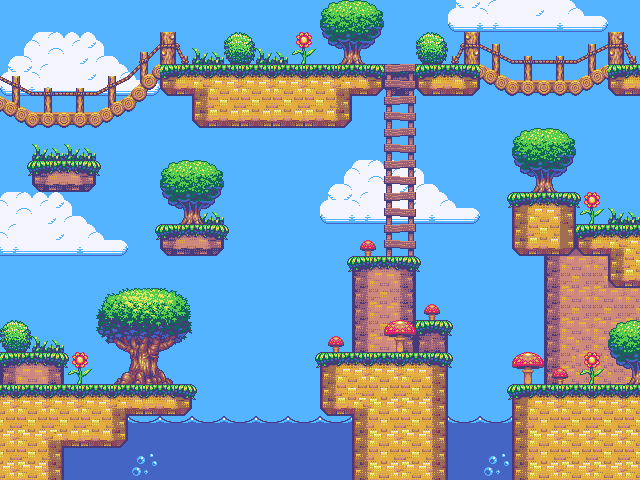
As you can see it is a very different and simplistic style. |
|
|
IP Logged |
|
|
pikmin4000
Seaman
Joined: 18 February 2013 Online Status: Offline Posts: 20 |
Posted: 19 August 2013 at 4:45pm |
|
Well I am liking my realistic approach as it shows more skill than a cartoonist simple one. But how would I continue the ocean after that point? Wouldn't it be obvious that it's a loop? When it is looped horizontally the people don't notice the cut as much since my website takes up most of the space.
|
|
|
IP Logged |
|
|
Erilis
Seaman
Joined: 22 January 2013 Online Status: Offline Posts: 8 |
Posted: 20 August 2013 at 11:22am |
|
Wow, huge improvements. This looks amazing.
Edited by Erilis - 20 August 2013 at 11:22am |
|
|
IP Logged |
|
|
pikmin4000
Seaman
Joined: 18 February 2013 Online Status: Offline Posts: 20 |
Posted: 20 August 2013 at 12:06pm |
|
Originally posted by Erilis Wow, huge improvements. This looks amazing. Thanks! |
|
|
IP Logged |
|
| |
||
Forum Jump |
You cannot post new topics in this forum You cannot reply to topics in this forum You cannot delete your posts in this forum You cannot edit your posts in this forum You cannot create polls in this forum You cannot vote in polls in this forum |
|
