[WIP]-walk animation
Printed From: Pixel Joint
Category: Pixel Art
Forum Name: WIP (Work In Progress)
Forum Discription: Get crits and comments on your pixel WIPs and other art too!
URL: https://pixeljoint.com/forum/forum_posts.asp?TID=5462
Printed Date: 22 April 2026 at 10:52am
Topic: [WIP]-walk animation
Posted By: cath881
Subject: [WIP]-walk animation
Date Posted: 26 November 2007 at 5:25pm
Hi everyone .. really need your help! so this is my first real animation ! ( haaard so this is my first real animation ! ( haaard  ) and i would like to know what you think about it and how i could improve it a bit ! The lineart isn`t even finished yet but i would like to be sure that the animation is alright before i go on ..it`s gonna be one of santa`s elves ..but he isnt even dressed up yet ) and i would like to know what you think about it and how i could improve it a bit ! The lineart isn`t even finished yet but i would like to be sure that the animation is alright before i go on ..it`s gonna be one of santa`s elves ..but he isnt even dressed up yet  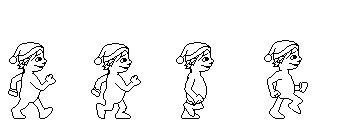  tutorial i used: http://www.idleworm.com/how/anm/02w/walk1.shtml - http://www.idleworm.com/how/anm/02w/walk1.shtml (really good one..helped a lot!) please please a few comments  |
Replies:
Posted By: thedaemon
Date Posted: 26 November 2007 at 5:47pm
| On frame 3 I would rotate the head down a bit, like a drag effect after the down "hit". Where the head drags down as the body goes up, and on the contact frame (1) make his head tilt up a bit to drag the opposite way. On the up pose frame 4 I wouldn't raise my foot up that high. I know he did in the tutorial but it's to show you the movement. Also, your arms are really long, he looks like he could almost drag knuckles. Nice work so far. How many frames do you plan on putting in this animation? I'm currently in school for animation and I learned walk cycles last semester, so if you have any questions, I would be glad to share the knowledge. Keep us updated. |
Posted By: M.E.
Date Posted: 27 November 2007 at 12:29am
|
Hello Cath881, My compliments on trying to get a walkcycle working on 4 frames! It will be a challenge! Use color blocks for the limps You will get a better understanding that the body parts will look as they are replacing eachother. Take for example a look at the positions of the legs in frame 1 and 4 It will be swapped too fast so that the eye thinks that the front is swapped by the rear. The same is going on with the arm movement. The arms of frame 1 and 2 are too similar. Probably the 8 frames from the tutorial aren't of help to you when you want to make a 4 frame animation. Everything needs to be positioned differently to get the smooth movement into the four frames. Check some tutorials on a running animation since the frame count will be closer to the one you are after. There are a lot of comments to be made, but at first you could start with the color blocks and get the individual body parts to move back and forward. Good luck! Best regards from M.E. ------------- http://www.kunststukken.nl - KunstStukken.nl M.E. Art |
Posted By: cath881
Date Posted: 27 November 2007 at 2:06am
like i thought..a lot of work still needs to be done here! thedaemon:i dont know if i understood correctly what you were explaining for the movement of the head but i`ll try something and update !;) ..i was planning on using only 4 frames but i might add a few if it can make the movement look more natural..dont know yet .. .. you`re right for the 4rth frame; the foot is raised to high ,i`ll try to correct it ! and you`re knowledge in animation is really welcome since i dont have any ! lol ;) M.E:yep..good idea ..i`ll do this and see how it looks then;)thx for the detailed answer  and small question..is it even harder to make a character run , jump..or do any other action?coz if making him walk takes so long...  thanks 4 commenting guys ..it`s appreciated  |
Posted By: Skaka
Date Posted: 27 November 2007 at 5:42am
|
Dude good animation (better than what I've done) but you might wanna use more than 4 frames otherwise it looks like his legs are effectively switching sockets.
------------- Ars longa, vita brevis. |
Posted By: cath881
Date Posted: 27 November 2007 at 2:05pm
I`m back!;) thx skaka ..still using 4 frames but i changed a few things and i think that it looks better now! here it is:  what changed : added a tiiiny movement of the right hand on frame 2 , movement of the head on frame 3 (thedaemon : hope that i got it right! ) , lowered the knee on frame 4 ..and added the clothes :p and color blocks like M.E said . . .think that i`ll start the shading |
Posted By: thedaemon
Date Posted: 27 November 2007 at 5:21pm
| Looks much better. The head bobble looks good, not too extreme but definitely helps. Still the only thing that bothers me is the arms being so much longer than the legs. You really need 8 frames (these 4 then 4 more of the same poses to leg the other side of the body do the same. Right now this is 1/2 of a full cycle. I know it sounds like more work, but honestly its the same frames as these with the legs and arms flipped to the other side. I see you did some overlap of the motion of the cotton ball, nice touch. Keep us updated. |
Posted By: cath881
Date Posted: 29 November 2007 at 2:47pm
Update! ;) -> the daemon: you`re right for the arms..i`ll b more careful next time..didnt feel like changing them on this one :p and not that i`m lazy but i`ll leave it like this for the moment..already spent a lot of time on the little guy ;) dont have a lot of free time (exams coming up -_-") and i would really like to add a tiny background to it !!:)thx agaiin 4 the comment :) |
Posted By: Doomcreator0
Date Posted: 29 November 2007 at 3:01pm
|
The way that arm facing us moves is really wierd, it's annoying me kind of. It looks like his arm just pops back to the back instead of going backwards, it's odd. ------------- 
|
Posted By: Metaru
Date Posted: 29 November 2007 at 10:01pm
|
exactly. The main problem is that the character appears to have one single arm that switches places arround his chest on each step. or giving a quick jab while kicking a can. this is caused because you're triying to make a walking animation based on the one in the tutorial with only the first four of 9 frames that the original had. since yout cut it in half, the other 5 frames that connected the end with the begining doesn't exist and the cycle fails to... ehm, cycle.  \_______________________________/ wich means that it wouldn't work if you crop it by half: you have to do it like it portrayed above to work. in fact, if you still want to crop a walking /running cycle, you always remove the pair frames, this means if you have a 9 frame animation, you remove frames number 2, 4, 6 and 8. but in any case, If you really want to make a working 4 frame animation, you'll have to make your own from scratch. but don't worry, the gallery is full of walking animation examples that will surely help you. its easier than iit appears to be, believe me. on a side note, thanks for the link(it's an excelent reference). I'll take it to the forum's toturial thread. edit: almost forgot: avoid using the example as a base: tracing doesn't give you EXPerience points. ------------- I ate leel's babies |
Posted By: Skaka
Date Posted: 30 November 2007 at 12:16am
|
Haha, that's the same course that taught me to do a walk cycle. Longest few hours of my life :P
------------- Ars longa, vita brevis. |