Poison ninja!
Printed From: Pixel Joint
Category: Pixel Art
Forum Name: WIP (Work In Progress)
Forum Discription: Get crits and comments on your pixel WIPs and other art too!
URL: https://pixeljoint.com/forum/forum_posts.asp?TID=5665
Printed Date: 24 February 2026 at 3:49pm
Topic: Poison ninja!
Posted By: Elwin
Subject: Poison ninja!
Date Posted: 27 December 2007 at 7:16am
This is an icon, for a remix song one of my friends is making for our freewebs site, which is in development.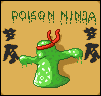 I already think I'm close to finished, but the blob ninja doesn't really blend well enough into the image I think... Of course there'll be a million problems with the AA, as I am nowhere near experienced with it. One of my first tries on outside AA actually.  |
Replies:
Posted By: Hatch
Date Posted: 28 December 2007 at 8:45pm
|
Hey.
I think the reason your blob doesn't blend well is because you haven't AA'd him to the BG! You've only done the kanji. You can AA him with the same colors your using for the kanji (not ideal, but you've got 'em, so use 'em), but I would darken both of them (the AA colors) a tad. There's just too big a jump between the black (and your dark green, I zink) and your darkest AA color. Sorry for the extreme awkwardness of the phrasing of that last paragraph, not to mention this one, yes. EDIT: you're != your ------------- |
Posted By: Elwin
Date Posted: 29 December 2007 at 12:07am
|
Thanks, I'll try that ^^ Edit: xD It looks blurry now, doesn't it? 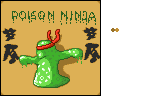 |
Posted By: Hatch
Date Posted: 29 December 2007 at 11:13am
Let's see what happens when we grayscale part of your image:

(zoom please) Notice how similar the grays are that were your dark green and darkest AA color? Having them so close in lightness value like that defeats the purpose of AA, dig? The solution is to lighten the AA color, but it's sort of a balancing act, as you're going to try to reuse it for AA-ing from black, so yeah. As far as technique goes, you should be breaking into your outline with your AA, and you should be doing internal AA. I edited a small section to illustrate:   
(Yours, mine, anim) http://pixeljoint.com/forum/forum_posts.asp?TID=706&PID=74416#74416 - Here's a couple of cool and informative posts about AA in the tutorials thread explaining the theory behind AA. ------------- |
Posted By: Elwin
Date Posted: 29 December 2007 at 11:23am
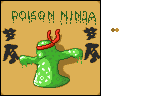 So... Is this any better? ^^ Anyway, many thanks for the great help :) So... Is this any better? ^^ Anyway, many thanks for the great help :)
|
Posted By: Hatch
Date Posted: 29 December 2007 at 12:07pm
|
It's an improvement. Keep pushing, and don't forget internal AA! ------------- |
Posted By: Elwin
Date Posted: 29 December 2007 at 12:10pm
| What is internal AA? ^^ |
Posted By: Hatch
Date Posted: 29 December 2007 at 12:21pm
|
Sorry for being unclear. What I mean is that if you want your piece to have an outline, you need to AA the outline externally to the background, outside the outline, as well as AA'ing it internally, inside the outline. ------------- |
Posted By: Elwin
Date Posted: 29 December 2007 at 12:22pm
|
Oh, internally is inside AAing ^^ Thanks ^^ Edit: Made some internal AA I think ^^ 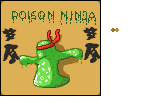 |