 | Active TopicsSearchRegisterLogin |
| WIP (Work In Progress) | |
 Pixel Joint Forum : Pixel Art : WIP (Work In Progress) Pixel Joint Forum : Pixel Art : WIP (Work In Progress) |
 Topic: Colors problem Topic: Colors problem |
  |
| Author | Message |
|
Temessis
Midshipman 

Joined: 21 August 2021 Online Status: Offline Posts: 54 |
   Topic: Colors problem Topic: Colors problemPosted: 23 April 2016 at 10:21am |
|
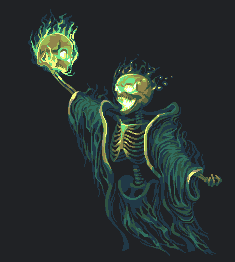
Got some problems with coloring this image, probably with shaping too (nope, this shouldn't be human skeleton).
I'm trying, mixing and making new color ramps, but I can't make it properly... That contrast 
 
|
|
 IP Logged IP Logged |
|
|
eishiya
Commander 

Joined: 04 August 2022 Online Status: Offline Posts: 1109 |
Posted: 23 April 2016 at 11:42am |
|
There are some construction issues, the skeleton looks very flat. That will make it hard for the image to look good no matter what the colours are.
Your AA is quite messy, which is probably also working against your ability to choose better colours. Disregarding AA for now, choose colours to make the skeleton read more clearly (make the mid-purple lighter, perhaps), and then adjust from there. |
|
|
IP Logged |
|
|
NancyGold
Commander

Joined: 27 October 2021 Online Status: Offline Posts: 526 |
Posted: 24 April 2016 at 8:51am |
|
Sword handle blends with skeleton, which itself blends into background color. The head is just a blob of pixels and the bones don't read as bones or meat. The colors could be a little more contrast. Pixels are somewhat messy.
|
|
|
IP Logged |
|
|
Temessis
Midshipman
Joined: 21 August 2021 Online Status: Offline Posts: 54 |
Posted: 24 April 2016 at 10:50am |

Changed colors and shapes, but still something is wrong for me... |
|
|
IP Logged |
|
|
eishiya
Commander
Joined: 04 August 2022 Online Status: Offline Posts: 1109 |
Posted: 24 April 2016 at 11:24am |
|
You're drawing the ribcage as if it's flat, like a flyswatter. The ribcage has a rounded shape, more like an inverted egg. Add shading according to the imagined 3D form of the object you're drawing, not according to its 2D shape on the canvas.
|
|
|
IP Logged |
|
|
drain
Commander

Joined: 09 June 2016 Online Status: Offline Posts: 95 |
Posted: 26 April 2016 at 8:04am |
|
As with the statement of eishiya, draw the shapes of different bones accordingly, layering a brighter color slightly in front of a darker color can give a impression of 3D,
This piece by ADrawingMan can simulate what a ribcage should look like, examine how he layered put a darker color at the back, so the lighter color looks like it protruding more. |
|
|
IP Logged |
|
|
dpixel
Commander

Joined: 03 February 2015 Online Status: Offline Posts: 564 |
Posted: 26 April 2016 at 12:27pm |
|
I was intrigued by this piece and how might one light a rib cage from the rear. It's sort of something, but not quite there...lol
Edit: 
|
|
|
|
|
|
IP Logged |
|
|
Temessis
Midshipman
Joined: 21 August 2021 Online Status: Offline Posts: 54 |
Posted: 27 April 2016 at 1:41pm |

Re-shaping once more, only bones without ribcage, still missing some pixels on hands/arms :v //Edit Changed the size of skull, added "double" bones on arm (like on image from @drain), added ribcage (still wrong  ) and else, also added some AA. I have to "repair" the hands ) and else, also added some AA. I have to "repair" the hands  Anyway, I really like upper bone of both arms with AA, I'm in love with it Anyway, I really like upper bone of both arms with AA, I'm in love with it 
@dpixel, I really like these colors, I will try something with similar of them (COMPARE) 
|
|
|
IP Logged |
|
| |
||
Forum Jump |
You cannot post new topics in this forum You cannot reply to topics in this forum You cannot delete your posts in this forum You cannot edit your posts in this forum You cannot create polls in this forum You cannot vote in polls in this forum |
|
