 | Active TopicsSearchRegisterLogin |
| WIP (Work In Progress) | |
 Pixel Joint Forum : Pixel Art : WIP (Work In Progress) Pixel Joint Forum : Pixel Art : WIP (Work In Progress) |
 Topic: Shyub Sprite Topic: Shyub Sprite |
  |
| << Prev Page of 2 |
| Author | Message |
|
RollerKingdom
Commander 

Joined: 11 January 2009 Online Status: Offline Posts: 388 |
   Posted: 16 February 2010 at 12:17pm Posted: 16 February 2010 at 12:17pm |
|
Here's a better update
I think im starting to like it more  any idea on how i could shade his right foot? or i should i leave it as a flat shading like that? Edited by RollerKingdom - 16 February 2010 at 12:17pm |
|
 IP Logged IP Logged |
|
|
Ninja Crow
Commander

Joined: 02 June 2009 Online Status: Offline Posts: 323 |
Posted: 16 February 2010 at 1:25pm |
|
Hey, it's looking great - I'm really impressed that you were willing to start over from an earlier stage!
Is this going to be his costume? It looks cool. I don't know about shading that back leg; do you have a red that might look dark enough for the shadow? It also looks like a shadow from his front (rightside) leg might fall on it, which would make a patch of shadow across the upper calf (with a diagonal edge like this: \ Sorry if that looks like a smiley!) I only have three things to mention at this point, since you're taking this along so impressively fast:
And I'm curious as to your colour count so far. |
|
|
IP Logged |
|
|
RollerKingdom
Commander
Joined: 11 January 2009 Online Status: Offline Posts: 388 |
Posted: 16 February 2010 at 2:02pm |
|
alright ill work on those tips
|
|
|
IP Logged |
|
|
RollerKingdom
Commander
Joined: 11 January 2009 Online Status: Offline Posts: 388 |
Posted: 16 February 2010 at 2:35pm |
|
Here worked some good minutes on it,
Refined the piece more, added more details
and AA, im keeping the background to help out the piece more
  I actually really liked it :) i don't think i would of liked it without the help and tips from you guys Ive also updated the portrait looks much better as well with the new skin 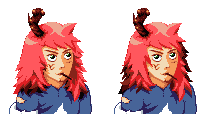 Edited by RollerKingdom - 16 February 2010 at 6:25pm |
|
|
IP Logged |
|
|
Ninja Crow
Commander
Joined: 02 June 2009 Online Status: Offline Posts: 323 |
Posted: 16 February 2010 at 7:33pm |
|
That...looks...incredible!
Really great refining in that last step! There may need to be a shadow on the inside of the rightside thigh, and also under the rightside knee. (p.s. As a purely personal style choice, I suspect the tears in his costume would look better if they were slashes - a bit more narrow and with tapered, pointed ends - but that's entirely up to you, of course.) This doesn't look like a dude I'd want to mess with! Great job! |
|
|
IP Logged |
|
|
RollerKingdom
Commander
Joined: 11 January 2009 Online Status: Offline Posts: 388 |
Posted: 16 February 2010 at 7:45pm |
|
I added some slashes with it but im not sure if i understood what you said about the rightside thigh and knee shadow..
is it on his RIGHT LEG or our RIGHT SIDE *which would be his left* ive added a bit of shadow on what i understood but idk if it made any diff  Edited by RollerKingdom - 16 February 2010 at 7:45pm |
|
|
IP Logged |
|
|
Ninja Crow
Commander
Joined: 02 June 2009 Online Status: Offline Posts: 323 |
Posted: 16 February 2010 at 8:17pm |
|
'Rightside' = our 'right side'.
Here's a quick edit to show what I meant: 
I put bright red on his rightside leg to show areas where I think some shadow might go. I also edited the two tears on his shorts to show what I meant by slashes that are narrow and pointy. Notice how they follow the 3-D volume of the leg? I don't know if you like that kind of detail, but I tend to put slashes and scars on any blank area of a character I can get away with! Eh, I also messed a bit with his foot, because I think the big toe is still a bit too small. Sorry! |
|
|
IP Logged |
|
|
RollerKingdom
Commander
Joined: 11 January 2009 Online Status: Offline Posts: 388 |
Posted: 16 February 2010 at 8:37pm |
|
Here, fixed it a bit more
thank you for the demonstration  Do you think its ready for the gallery? |
|
|
IP Logged |
|
|
Ninja Crow
Commander
Joined: 02 June 2009 Online Status: Offline Posts: 323 |
Posted: 17 February 2010 at 2:30am |
|
Looks good to me (dang, wish I was more of an expert on such things, though). You can let it hang for a day or so and see what everyone else thinks, but I'd say it's probably way more important to keep up the excellent momentum you've shown here and plow directly into new pieces.
By the way, are you keeping the background? Gallery rules are a bit tetchy on that, but if ya have a really good excuse.... |
|
|
IP Logged |
|
|
Manupix
Commander

Joined: 05 November 2024 Online Status: Offline Posts: 771 |
Posted: 17 February 2010 at 8:04am |
|
Looking real good, you've put some work into it and it shows!
I see an anatomy problem in the left (ours) leg, can't point what exactly. Looks something like the knee is pointing too much to the side? Compared to the muscular legs, the torso and shoulders might be a bit wider. The face looks a bit noisy. The toothpick is unreadable, maybe make it horizontal and point it to the left? At the pixel level, you still have noisy outlines (those blue pixels on the legs and red on the head stick out a lot). |
|
|
IP Logged |
|
|
RollerKingdom
Commander
Joined: 11 January 2009 Online Status: Offline Posts: 388 |
Posted: 17 February 2010 at 9:13am |
|
Thank you Manupix, I played around with the toothpick but when it's on the left side it looks horrible + a little bit less noticeable. I fixed the noisy outlines. Im submitting it, im so damn happy with the outcome lol, looks like a real fighter now compared to the previous stages.
|
|
|
IP Logged |
|
| << Prev Page of 2 |
| |
||
Forum Jump |
You cannot post new topics in this forum You cannot reply to topics in this forum You cannot delete your posts in this forum You cannot edit your posts in this forum You cannot create polls in this forum You cannot vote in polls in this forum |
|
